No results found for ""

Try checking your spelling or using more general terms.

Sign In
HomeLaptopsMacbookLenovoLenovo ThinkBook Plus Gen 3 • (i7 12th Gen, 16GB RAM, 512GB SSD, 17.3” Touch Display)
New
Lenovo ThinkBook Plus Gen 3 •  (i7 12th Gen, 16GB RAM, 512GB SSD, 17.3” Touch Display)
Lenovo

Lenovo ThinkBook Plus Gen 3 • (i7 12th Gen, 16GB RAM, 512GB SSD, 17.3” Touch Display)

KSh115,000
In Stock

Key Features

  • Dual-display multitasking with a large 3K 120 Hz primary panel and a dedicated 8-inch touch companion screen.
  • “Waterfall” mode for extending long documents from the primary display down onto the smaller vertical display.
  • Integrated pen support for quick notes, annotation, drawing, and creative tasks.
  • Optional E-Color Pen for sampling physical colours and locating related Pantone references.
  • Strong mobile productivity performance from 12th-gen Intel Core processors, LPDDR5 RAM, and PCIe SSD storage.
  • Wide connectivity, including Thunderbolt 4, USB-C, HDMI 2.1, and two USB-A ports.
  • Business-oriented privacy and login features: IR camera, webcam shutter, fingerprint power button, and TPM 2.0.
  • Premium entertainment and meeting features including Dolby Vision, Dolby Atmos, Harman/Kardon speakers, and dual microphones.
1

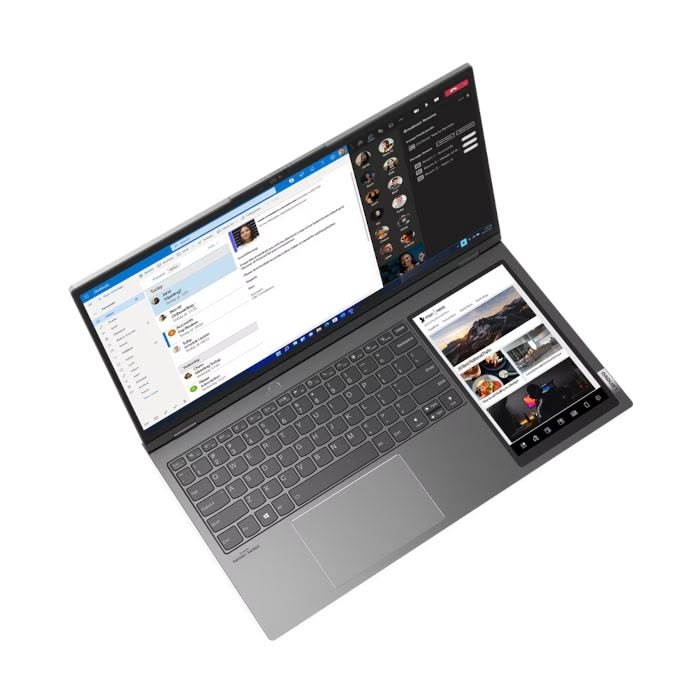
The Lenovo ThinkBook Plus Gen 3 is a premium, productivity-focused laptop built around an idea that most laptops only partially solve: people often need more than one screen, but external monitors are inconvenient to carry. Lenovo’s answer is a full-size 17.3-inch business laptop with a second 8-inch touchscreen integrated directly beside the keyboard. Rather than using a small secondary display on the lid or a detachable accessory, the ThinkBook Plus Gen 3 places a vertical, phone-like display in the palm-rest area, creating a compact two-screen workspace that travels with the user.

Its main 17.3-inch display is unusually wide, using a 21:10 aspect ratio and 3K resolution. This gives it substantially more working space than a typical 16:9 laptop screen, especially for wide spreadsheets, multiple browser windows, presentation editing, coding, timelines, dashboards, and documents viewed side by side. The 120 Hz refresh rate makes scrolling and cursor movement feel smoother, while the 99% DCI-P3 colour coverage, Dolby Vision support, and 400-nit brightness help make the panel suitable for visual work as well as office tasks. It is not merely a large screen: it is designed to act like a flexible desktop workspace in a portable form.

The 8-inch secondary display is the centerpiece of the design. It can be used as an extended Windows display, a duplicated display, or a dedicated control and reference space. A user can keep Microsoft Teams or Zoom chat messages on the small display during a meeting, leave the main screen free for a presentation, write quick notes while reading a document, monitor a calendar or email inbox, control music, or keep a phone-connected app visible. It can also hold reference images, calculations, translation tools, media controls, task lists, or chat conversations without covering the main work area. This arrangement is particularly useful for people who routinely switch between applications and need information available at a glance.

Lenovo also developed productivity features specifically for this dual-screen layout. One example is “waterfall” mode, which extends a long page or document from the main display down into the smaller screen. This can be useful when reading lengthy reports, reviewing web pages, working with vertically structured spreadsheets, or comparing content without repeatedly scrolling. The screen supports touch and pen input, allowing users to annotate, sketch, take handwritten notes, sign documents, or make quick edits. The optional Lenovo E-Color Pen is aimed at creative users: it can sample a colour from a physical object and use companion software to identify closely matching digital and Pantone colour values.

Performance is based on 12th-generation Intel Core H-series processors, with configurations that include Core i5 and Core i7 options. Combined with up to 32 GB of LPDDR5 memory and PCIe NVMe SSD storage, the ThinkBook Plus Gen 3 is designed to handle business multitasking, large spreadsheets, browser-heavy research, collaboration tools, presentations, software development, light photo and video editing, and data analysis. Its Intel Iris Xe integrated graphics are capable for everyday visual and productivity workloads, but the laptop is not intended as a dedicated gaming computer or a workstation for intensive 3D rendering, advanced CAD, or GPU-heavy video effects.

The device also includes features expected from a modern business laptop. It has a Full HD infrared camera for Windows Hello facial recognition, a physical ThinkShutter camera cover for privacy, a fingerprint reader integrated into the power button, and TPM 2.0 hardware security. Audio is handled by Harman/Kardon speakers with Dolby Atmos support, while dual-array microphones help with calls and meetings. Connectivity is strong, with Thunderbolt 4, USB-C, HDMI 2.1, two USB-A ports, Wi‑Fi 6E, and Bluetooth. This makes it practical to connect docks, fast storage, projectors, wired displays, and other office equipment when a larger setup is needed.

Although it has a large 17.3-inch main display and an additional 8-inch screen, the ThinkBook Plus Gen 3 remains relatively slim at roughly 18 mm thick and weighs about 2 kg. It is therefore less portable than a 13- or 14-inch ultrabook, but much easier to travel with than a conventional laptop plus a portable monitor. Its storm-grey aluminum construction, backlit spill-resistant keyboard, glass touchpad, 69 Wh battery, and 100 W USB-C rapid charger reinforce its premium business positioning.

Overall, the ThinkBook Plus Gen 3 is best described as a portable dual-monitor workstation. It is designed for professionals, multitaskers, analysts, creators, executives, remote workers, and students who benefit from keeping several sources of information open at once. Its unusual secondary touchscreen is not a gimmick when used well—it provides a genuinely useful space for communication, notes, controls, reference material, and pen interaction, while the main ultra-wide 3K display remains focused on the primary task.

ComponentSpecification
ModelLenovo ThinkBook Plus Gen 3 / ThinkBook Plus G3 IAP
Processor12th Gen Intel Core H-series; configurations include Core i5 and Core i7
GraphicsIntegrated Intel Iris Xe Graphics
Operating systemWindows 11 Home or Windows 11 Pro, configuration dependent
Memory16 GB or 32 GB LPDDR5-4800; soldered, non-upgradable
StoragePCIe NVMe M.2 SSD; Lenovo official configurations list up to 1 TB, while some retail markets list up to 2 TB
Main display17.3-inch IPS touchscreen, 3072 × 1440 (3K), 21:10, 120 Hz, 400 nits, anti-glare, 99% DCI-P3, Dolby Vision, Eyesafe-certified
Secondary display8-inch IPS multitouch display, 800 × 1280, 10:16, 60 Hz, 350 nits, glossy anti-fingerprint finish
Touch10-point multitouch on both displays
PenLenovo Integrated Pen; optional Lenovo E-Color Pen in some configurations/markets
CameraFHD 1080p + IR hybrid camera with physical ThinkShutter privacy cover
AudioTwo 2 W Harman/Kardon speakers, Dolby Atmos, dual-array noise-cancelling microphones
WirelessWi‑Fi 6E (802.11ax), Bluetooth 5.1; some retail pages state Bluetooth 5.2
Battery69 Wh battery; 100 W USB-C PD 3.0 charger with Rapid Charge Pro
Ports1× Thunderbolt 4 / USB4, 1× USB-C 3.2 Gen 2 with PD and DisplayPort, 2× USB-A, HDMI 2.1, 3.5 mm headphone/microphone combo
External displaysSupports the built-in display plus up to three external displays; HDMI supports up to 4K at 60 Hz
SecurityTPM 2.0, fingerprint reader integrated into power button, IR facial recognition, camera privacy shutter
KeyboardSix-row, spill-resistant, backlit keyboard
DimensionsApprox. 410.9 × 230.2 × 17.95 mm / 16.18 × 9.06 × 0.71 in
WeightUnder 2.0 kg / 4.4 lb
FinishStorm Grey, dual-tone aluminum construction

Your Cart (0)

Your cart is empty

Looks like you haven't added any gadgets to your cart yet.